Thursday, 1 February 2018

Benny's LEGO Room - Part 3 - Complete Room Tour & Entertainment System


G'day everyone welcome to the third and final part of my initial LEGO Room setup.

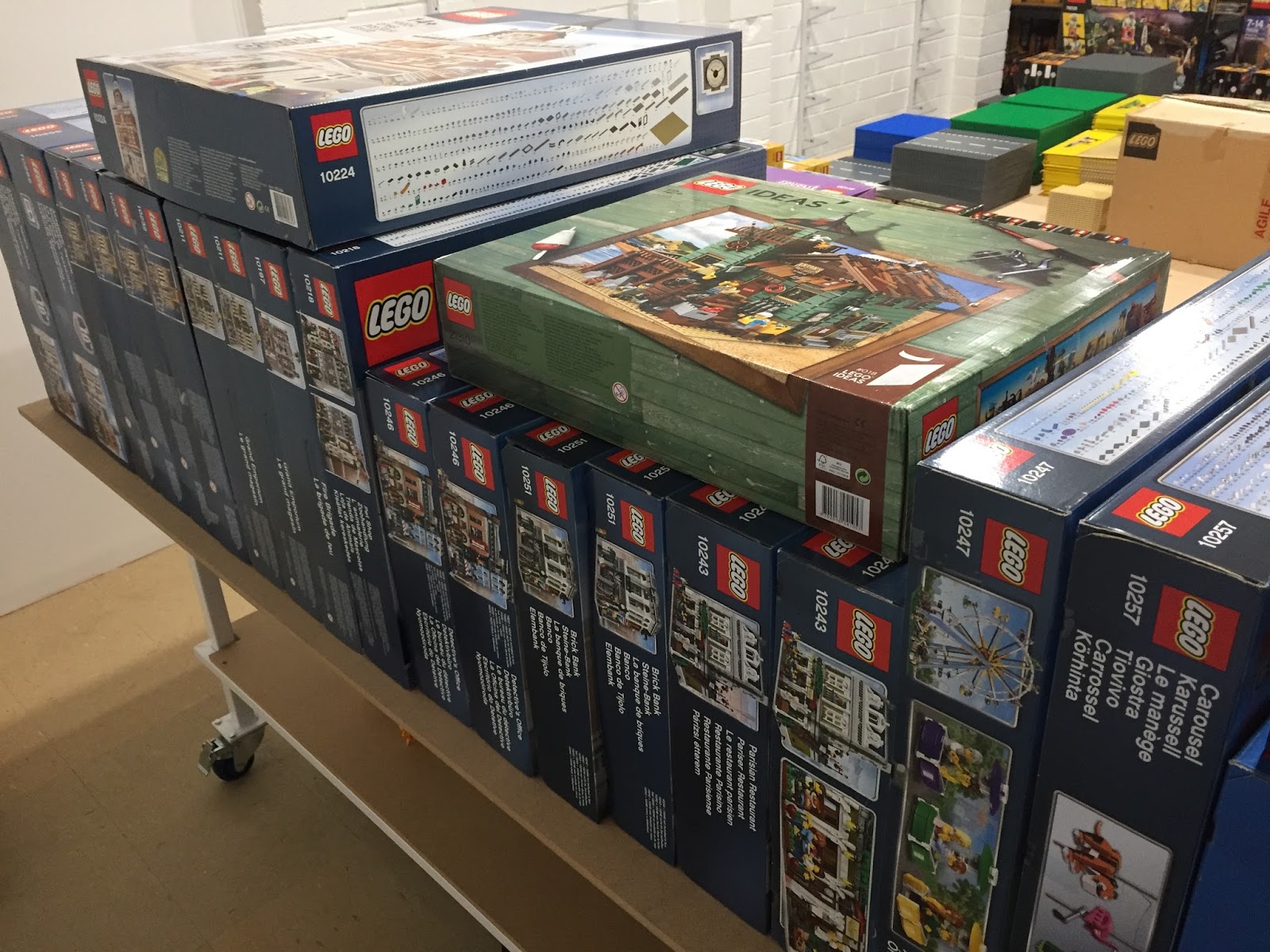
Look, actual LEGO sets, that makes it official! I was actually still in the process of installing the rest of the under table LEDs so I had just placed everything on top of the table and on the shelves, roughly sorted by theme.

The view of my spare parts from the door. Chewie checks my credentials before I'm allowed to enter.

Star Wars UCS good guy ships.

Star Wars UCS baddies. Lots of yet to be opened Star Wars boxes.

Mixels (for the kids) and random Classic boxes.

More Star Wars boxes yet to be opened. Including the Executor.

Lots of City stuff for... the City...

Starting to get into the more interesting City and Licensed Theme stuff.

Trains Trains TRAINS!

Creator Expert Modular Buildings, some are multiples for expanding options.

Smaller Creator 3in1 houses and buildings.

Super Heroes - No arguments from me, I love both DC & Marvel!

The centerpiece of the entertainment system is the 65 Inch Samsung KS8500 4K Curved TV. Normally I wouldn't go for a curved TV but I got this on a great sale at JB Hi Fi one day compared to its flat screen brother and for a while it was my main TV in the GEEK Room but have since swapped it out for an OLED. So into the LEGO Room it went. One of the reasons I considered this TV in the first place was a review on the RTINGS website. These guys do very in depth reviews of modern TVs and are a great resource for setting up and calibrating a new TV.


65 Inches of curved.

Straight on view looks sweet.

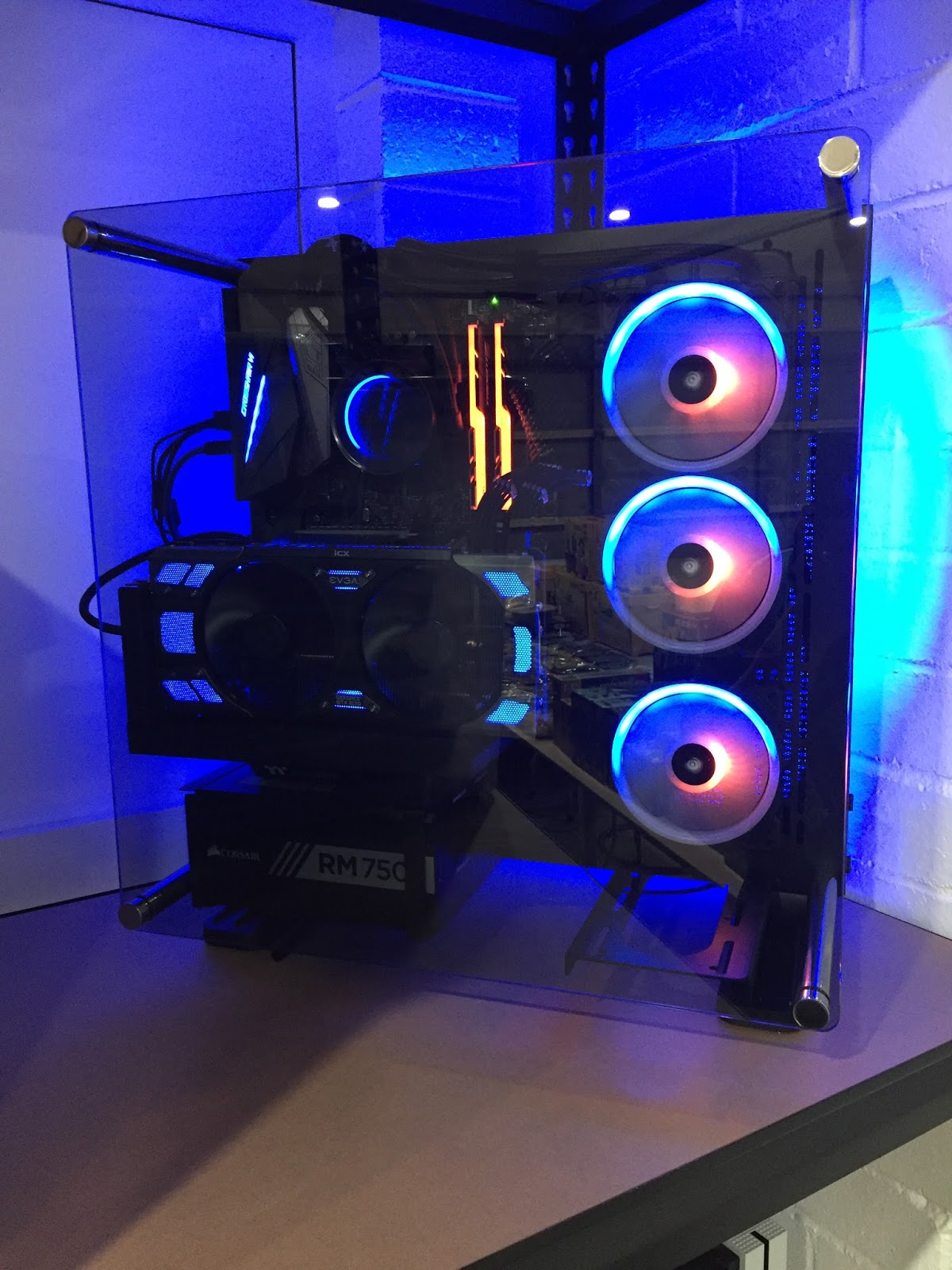
The other main star of the entertainment system is the new PC I built. It will be used for LEGO digital designing & BlueBrick, streaming YouTube & Netflix etc, sneaking in some games while sitting in the City and now video editing for my YouTube channel and this Blog. Originally I was going to wall mount it next to the TV but it just stuck out too far and I didn't trust my clumsy self enough to not smash my shoulder on it every time I walked past. It's now found it's place to the far right of one of the main shelves and when I finish rebuilding the UCS Death Star II (in the tub) they will sit side by side. One to destroy and one to create.

Sacrificing some LEGO real estate for the PC and Xbox.

My new Ryzen beast. I named it BenZen.

Blue and Orange lighting to match my Blog branding.

The fans have a swirly pattern that reminds me of the round things in the TARDIS.
I've always liked the round things. What are they? I don't know.

The tech specs if anyone is interested:
Case: Thermaltake Core P3 with Tempered Glass
CPU: AMD Ryzen 7 1700X overclocked to 4.0GHz on all 8 Cores, 16 threads
CPU Cooler: NZXT Kracken X52 240mm AIO Radiator Cooler
Motherboard: ASUS Crossahair 6 Hero - X370 Chipset
RAM: 16GB G. Skill Trident Z RGB overclocked to almost 3000MHz
Graphics: EVGA GTX 1070 FTW2 (nVidia)
Power Supply: Corsair RM750x Gold 750W
Primary Storage: Samsung 960 EVO 250GB M.2 SSD & Samsung 850 EVO 1TB SATA SSD
Secondary Storage: Seagate 2TB HDD
Custom black sleeved cables from CableMod
Windows 10 Pro & Adobe Photoshop/Premiere Elements 18

View from the middle of the City.

We ran 2x USB booster cables from the PC , up the wall, across the roof , down the opposite side behind the corner shelving unit and then to the middle of the tables where my keyboard and mouse await. We did it this way so that there were no crossing cables to trip on around the walkway. I use a Corsair Lapdog on my lap when I'm gaming on the couch in the GEEK Lounge so I grabbed another one on Black Friday for the LEGO Room. Any table room taken up by a keyboard means less space for LEGO and we can't have that. Throw in a couple of Star Wars bar stools I got for Christmas and we are all set.

Corsair K70 Rapid Fire mechanical keyboard with Cherry MX silver linear speed switches.

Corsair M65 Pro mouse with handy slow DPI button in easy thumbs reach.

Keyboard and mouse housed nicely in the Corsair Lapdog.

I added an Xbox One S primarily for watching Blu-Ray. I'm going to build a custom LEGO shroud around it to make it blend in with the LEGO models. Will need to include plenty of exhaust with these things of course.

Xbox One S - 500GB - White.

As I mentioned earlier I was still finishing up the LED strips and in the previous post I described my initial trouble with them not sticking. Happy to say after my solution they are now holding strong and showing no signs of letting go. I finished up the last 2 tables and am very pleased with the result. I can turn them on/off independently from the roof lights.

The LED strips will do justice for the models that will eventually be under the table.

This one reminds me of the old Nokia phone game Snake.

Underneath the tables I left enough space to either build or buy some form of storage. After looking through Bunnings at various drawer systems and tubs I found one particular 40 liter tub made by Ezy Storage that could be accessorized with trays and containers that hook onto a purpose lip under the lids. Taking one home to test I found it fit under the bottom shelf with barely a milometer to spare. Perfect. Around the entire table and including the middle standing area I could fit 36 tubs without double parking them. Back to Bunnings and I cleaned them out of everything they had in that size, which was only 16 tubs, and a bunch of accessories  I'll definitely grab more ASAP because I'd hate for them to swap styles in the meantime. I'll use them for parts storage once I start sorting it all again. I've already used some for my instruction books, train track and spare baseplates.

Like they were made to fit under there.

Great for storing my spare LEGO parts. Notice the hanging mini tub accessory inside.

A few less interesting yet important things of note are the 1080p security camera which works great in low light as well. We have 8 of these around the property... just in case.

Benny is watching!

Also a split system air conditioner to keep my collection cool in the Aussie summer... and me too I guess. I tried it out recently on a 40oC day and it managed to completely cool the room to a comfortable level in less than 15 minutes. I have a few ideas for the wall below the air con.

It's cool and quiet when I want it to be.

So that's about it for the LEGO Room initial setup for now. There will be minor updates when I add or change things around. If you haven't already please watch the accompanying video I made (my first) which goes in depth with a few plans and ideas and shows the room after I tidied everything up a bit more.

Leaving the room with the roof lights turned off. Looks nice.


Thankyou for following. Cya next time.

Thursday, 25 January 2018

Benny's LEGO Room - Part 2 - Setting Up Tables, Shelving, Lighting, TV

G'day everyone, welcome to Part 2 of making my LEGO Room.

It was time to transport the 5 tables to their long term home... my home. With some help from my friends, we lifted and loaded them one at a time onto two available work trucks. Only one would fit on each truck so we made 3 trips total. Being careful to avoid any rain because MDF boards will swell up with any moisture. At one stage on the way we had to seek shelter at a Bunnings Hardware store to avoid a short yet annoying rain session. They have a drive in hardware area for picking up wood etc. We made the most of it by enjoying a sausage sizzle lunch (a staple of Bunnings stores) and purchasing all the shelving units I needed for the room.

A little painters tarp for protection in case of light rain only. Lasted about 2 mins on the road...

The swivel wheels made pushing the tables into the garage a breeze. They were much smoother than I had anticipated. A few laps around the table with a tape measure to ensure it was square with the walls and it was all done!

Positioning all the tables in the correct order. Shelving boxes ready to be unpacked.

Only missing the last table in this shot. Waiting for the rain to pass.

Underneath where each table joins I clamped and screwed some smaller panels
to help level out the lips of each board. Especially where 3 boards meet in the middle space.

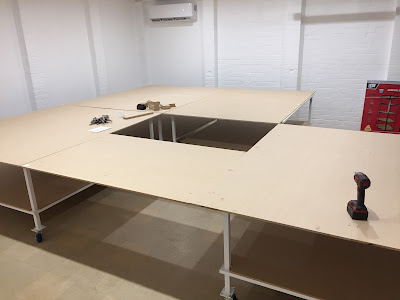
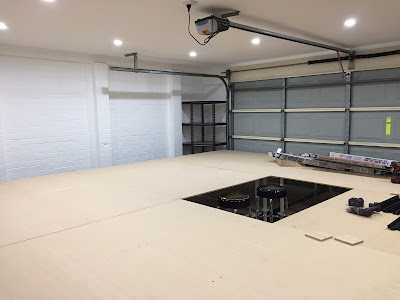
In the end I was so happy with the completed table being home and safe that I totally forgot to take a photo of it without anything placed on it. Doh...

After the shelves are installed there will be between 70cm and 90cm space to walk around the table on 3 sides. Plenty. The final side is against the roller door which is motorized so I can access it easily if needed just by raising it.

My plan for the shelving was to have one entire wall dedicated to UCS Star Wars models. Between the 2 Doors I could fit two 1500mm wide shelving units but seeing as I was never going to use the rear door I decided to place an extra 1200mm wide shelving unit. That rear door has a steel frame so we added a cross beam on the inside and on the outside we added a wooden frame and used silicone to weather proof and seal it shut. The space was perfect for the 3 shelving units, like it was meant to be.

A few days after Christmas when my family was over for a feed my Dad and Brothers were kind enough to help me assemble them all. Even putting up with my constant stopping them to measure out where I wanted the shelf heights to be.

The large shelving units are reserved mainly for my Star Wars Ultimate Collectors Series models but on the lower shelves I might put some battle scenes like Battle of Endor and Ewok Village or Assault on Hoth. We'll see how it plays out later.

2 side by side shelving units 1500 (wide) x 2000 (high) x 550mm (deep).
1 smaller 900 (wide) x 1800 (high) x 400mm (deep) fits alone in the far left corner.

1200 (wide) x 2000 (high) x 550mm (deep) shelf blocking the back door and  completing
the 4.2 Meter wide mega shelf. Large upper shelf space is for the UCS Death Star II.

Luckily I also found a corner unit in the same style as the rest that fits like a glove in the far corner. I think I'll use this for Ninjago/Nexo Knight.

Later in the two brick wall spaces next to the corner unit I'll be installing some modular style hanging shelves, allowing me to have approximately 10 shelves each. I plan to display Bionicles, Buildable Figures, Brickheadz and other smaller style builds on these once installed.
700 x 700 x 1800mm (high) corner unit fits into that space like a glove!

Even though as we were building them I measured and set where I wanted shelves, when it actually came time to add sets I then I spent at least two hours changing around almost all the shelf heights to better accommodate the viewing of models and appease my OCD.

View of the entire shelf wall. Chewie arrives for a surprise inspection!

2 hours later with many minor adjustments. I placed
some UCS models to help get the shelf heights correct.

I forgot to mention, early on in the garage prepping phase, my Father In Law sneaked in and installed some great looking LED downlights to replace the old fluoros. Fantastic surprise. Since the room is mainly white the light bounces around brilliantly. He also ran extra power to various spots in the room along with Ethernet and coaxial for TV. Thanks Pete.

10 LED downlights in a square pattern which pretty much follows the square table.

Pete also installed the modular shelving verticals for me. I spent a good 40 minutes working out how I wanted to space the shelves and therefore how many shelf clips I was going to need. I haven't made a decision on what material to use as the actual shelf, I have some left over MDF from the tables I could use but I may need to paint them depending how it looks.

Extra modular shelves are still a work in progress.

Remember that bottom level of the tables that was a bit dark, I mentioned it may need some lighting under there to do justice for model viewing. Off to Bunnings again and after reading every single different package I found some supposedly easy to install LED strips of various lengths with adhesive backing.

I ended up using 5x 5 Meter lengths and 2x 10 Meter lengths.

After many hours on my back between the table tops it was done and I was extremely happy with the LED strips... until I walked in the next day and found most of them were dangling off the table frame. Even though I cleaned and wiped the surface, the adhesive had managed to let go during the night.

My Plan B was to use even stronger double sided tape, so I went around and applied it to most of the backing. This stuff was almost impossible to peal off the table when I made a mistake. I was very happy with the solution... until the next day when AGAIN some of the had drooped off the able frame.

After a couple days thinking on and off about it and dismissing ideas such as cable ties (no space between frame and wood), ribbons (waaaaay to tedious), I decided to use an extra wide super strong weather resistant extra adhesive mega awesome clear sellotape and would wrap it around both the LED strips and the table frames lengthwise. It was like laminating the table and the frames together and with the sellotape holding from three different directions I was pretty sure it would hold this time... until a few days later when I was CERTAIN it was a success because everything was holding strong with no sign of movement. Phew.

Ultimately you're probably meant to supplement the adhesive with some staples or screws or something else to secure them more firmly.

After installing 4 straight 5 Meter lengths. I like it.
You can see the as yet unlit tables in the background for comparison.

The TV installation for me was going to be interesting. If I had done the wall mounting and wires myself it would have been a mess. Thankfully Pete has a lot of experience wall mounting TV's and he routed all the necessary cables through and from the roof and hid them inside some white channel which will be the only thing exposed. I have some ideas on how to make that channel into a bit of a feature or I can leave it white and let it blend in as best it can.

Having the TV mounted between 2 brick columns will greatly help the "don't bump into it factor" It barely comes out past the columns and I still have room to access the back of the TV from all sides.

Running Power, Ethernet, Coaxial and 2x HDMI cables all hidden behind the TV with the mounting plate.

The LEGO Batman Movie breaks in the TV. Looks clean.
Those boxes are gonna have to move soon to keep the view clear.

Super happy with how everything has finished so far!

It's time to move in all the LEGO and this garage has finally become a LEGO Room.

Part 3 will be a full tour of the completed LEGO Room including my first video. I'll also detail a little more about the entertainment and "productivity" system.

Monday, 22 January 2018

Benny's LEGO Room - Part 1 - The Tables

G'day guys, I wanted to share with you all the process of setting up my LEGO Room.

For the last 5 or so years my LEGO collection has been packed up awaiting the day when I can finally unleash it upon my very own LEGO room.

When we purchased our house my wife and I negotiated what rooms would be allowed to have LEGO and which would be free from the "clutter of colored plastic blocks that hurt my feet."

I was lucky enough to be granted THREE rooms in the house. The study, the front lounge and the double garage, which funnily enough has never housed a vehicle since the previous owner used it as a full workshop and previous to that was a display home sales room.

We had a long settlement which gave me months to work out what sort of layout would best suit the dimensions of the garage which are:
  • 6.4 x 6.2 Meters
  • Approx 25 x 24 standard LEGO baseplates (32x32)
  • Approx 800 studs across

I decided to go with a centralized table rather than tight against the wall, with a top and a secondary shelf below as well as space underneath for tub or drawer storage.

The table top would display my soon to be LEGO city layout and the bottom shelf will be for displaying primarily Star Wars sets.

I had 3 walls to play with for shelving as the roller door takes up one length. Large shelving units would be placed on one side of the table against the wall. Opposite them would be smaller modular type wall hanging shelves. After some more negotiating with the wife I was allowed... decided that I would wall mount a TV opposite the roller door. That way I could enjoy the room while watching movies and TV shows or streaming My favorite YouTube channels.

The boring part of all this was preparing the room like cleaning the industrial tile flooring and painting the walls all white as they were a mix of brick, plaster and various undercoats due to the place being a workshop beforehand.

Once that boring stuff was done it was time to get some custom tables in there.

To make transporting it home feasible, 5 smaller tables would be made up to create the large overall tabletop. I wanted to be surrounded by the city so I could either go with a squared U or an O shape. I decided to go with the O for that extra bit of real estate which meant committing to being able to kneel and duck under a 6th table top that would bridge two of the full tables.

Raw materials delivered, cut to size and ready for welding.

I work for a business that manufactures signage lightbox frames so thankfully I was able to use their skills and expertise to help me get this job done. My main man Kenny is a surgeon with a welding torch so one afternoon after work, with a slab of beer as adequate bribery, we were on our way to an actual table.

10 Table frames welded and waiting. 20 x 20 x 2mm galvanized steel square hollow section for the frames.
Added cross supports to prevent the wooden table tops from sagging in the middle.

20 Table legs standing at attention. 30 x 30 x 3mm galvanized steel square hollow section used for the legs.
Steel plates to attach wheels. They will have to withstand the full might of a LEGO addicts collection.

The merging of the frames and legs begins.
This table will have some serious clutch power holding it together.

I stayed well clear when the sparks were flying, jumping in only to help position things as needed.

Using extra cuts of steel to prop the upper and lower frames the correct height apart.

Once the tables had been welded together it was off to the powdercoaters for a lovely shade of gloss white to be applied. At one stage I had considered making each table a different color but I have another cheeky plan in mind if the white becomes too boring in the future.
The powdercoater does amazing work and has a fast turnaround so less than a week later and they were back in the factory awaiting the installation of lockable swivel wheels.

Here I have spread the frames out ready to attach the lockable swivel wheels.

Lucky the factory had some free space to lay them all out for this beauty shot. Wheels are attached.
Only the crossbar up top completing the square O shape is missing from this photo.

Table frames Done!

The table tops were always going to be the most annoying part of the assembly process. Because even the 5 individual tables were so large no single board was going to fit as I wanted so each top would have to be made up of 2 boards each plus an extra for the duck under section.

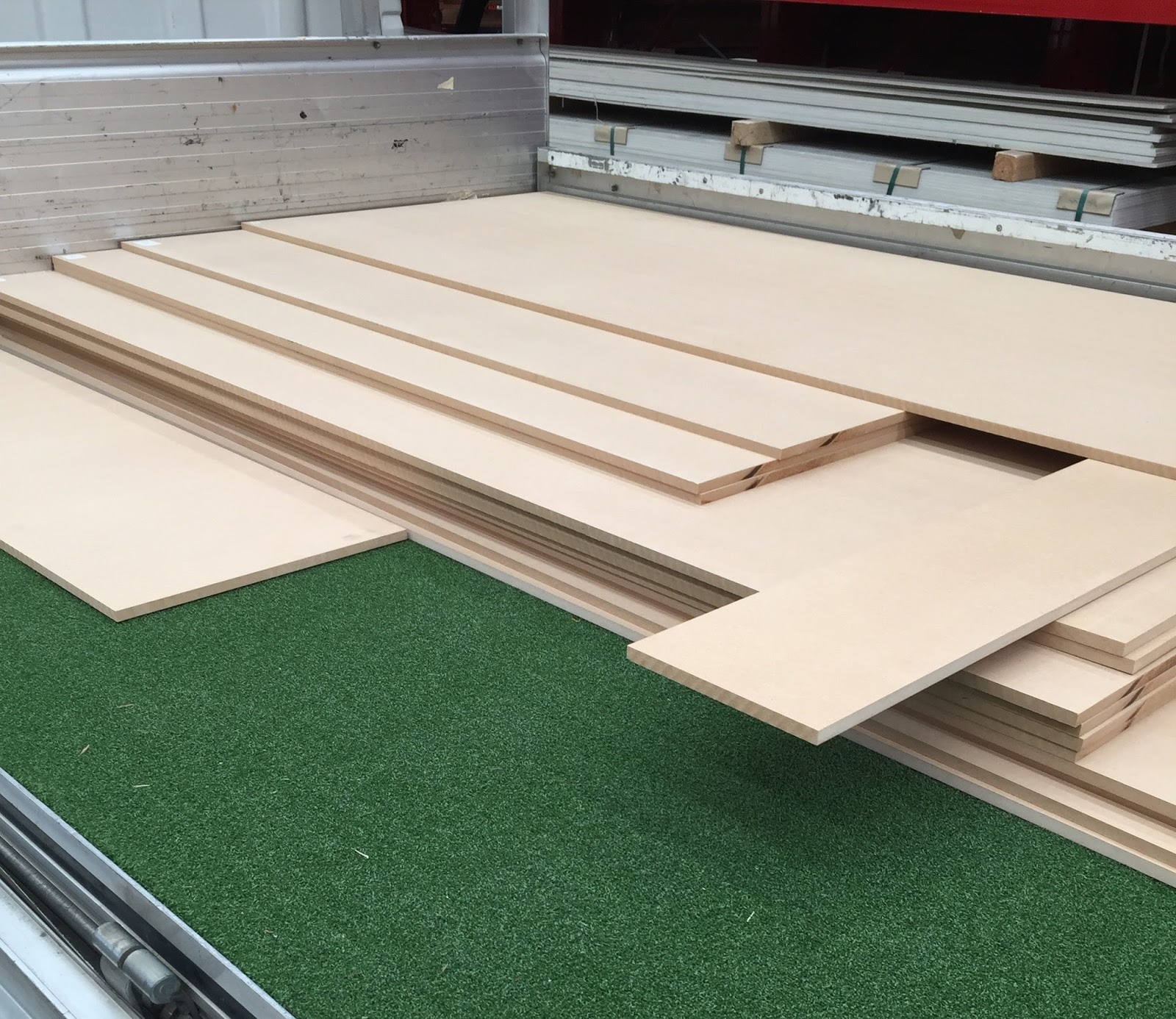
Off to Bunnings to source the 12mm MDF boards. I got 21 in total and they had to be cut to size in store as I was told our factory bench saw wasn't accurate enough. MDF sawdust is apparently very bad to inhale so I let the proffessionals handle it. Major thanks to my local Bunnings store because they went above and beyond with their cutting service. Each board required 2 cuts and, even though some were done in multiples, each time the attendant measured twice. Things went from great to amazing when the lady at the service counter didn't even want to charge me for the 42 total cuts. Fantastic thankyou. As they came off the saw I sticker labeled each one a letter so I could identify where it needed to go later.

Loading up the  work truck with 2440 x 1220 x 12mm MDF board cut to size for the table tops and bottom shelves.
I took the cutoffs as well as I figured I could use them to make more smaller shelves later if I wanted.

All hands on board for this part. Kenny, Buzz and John all got around the tables and helped me line everything up and screw it all together. Bottom shelves went in first and each one of those needed the corners cut out to allow the table leg to slot in. In the end we used over 200 high strength screws to attach the MDF to the steel frame, each required a hole to be drilled in the steel first. Tedious work, but many hands make the work go faster... or something like that. Champion blokes!

The clamps help hold the wood to the frame while we drill and tapped the screws.
 
Working our way around the table. Having the locking wheels made it much easier to adjust the table tops as needed.

After the last screw was drilled we measured  the diagonals across and we were within 3mm margin of error. Fantastic!
 
The lower shelves. Few too many shadows, I think it might need some extra lighting under there.

Very happy with the completed table. Even as a complete set it rolls so smoothly on those wheels.

So this has been a bit of a boring one but here are some less boring stats about the table which will lead to the potential for displaying a big LEGO City:
  • 4.4 x 5.1 Meters
  • 17 x 20 standard LEGO baseplates (32x32)
  • 544 x 640 studs
  • 316 standard LEGO baseplates (32x32) can fit on this space, which includes subtracting the middle standing zone.  
  • 323584 studs surface area across the table to work with!

With the tables construction complete it is time to get them home and into the LEGO room...

Stay tuned for Part 2.